
What is "Rollover"?
Rollover in Summ tracks how the cost basis is transferred during swap and non-taxable trade transactions, shown when hovering over the two-way arrow icon.
In Summ (formerly Crypto Tax Calculator), "rollover" indicates that the cost basis of the asset is transferred from the previous Swap and non-taxable Trade transaction(s). This information is displayed when you hover over the two-way arrow icon on a transaction.
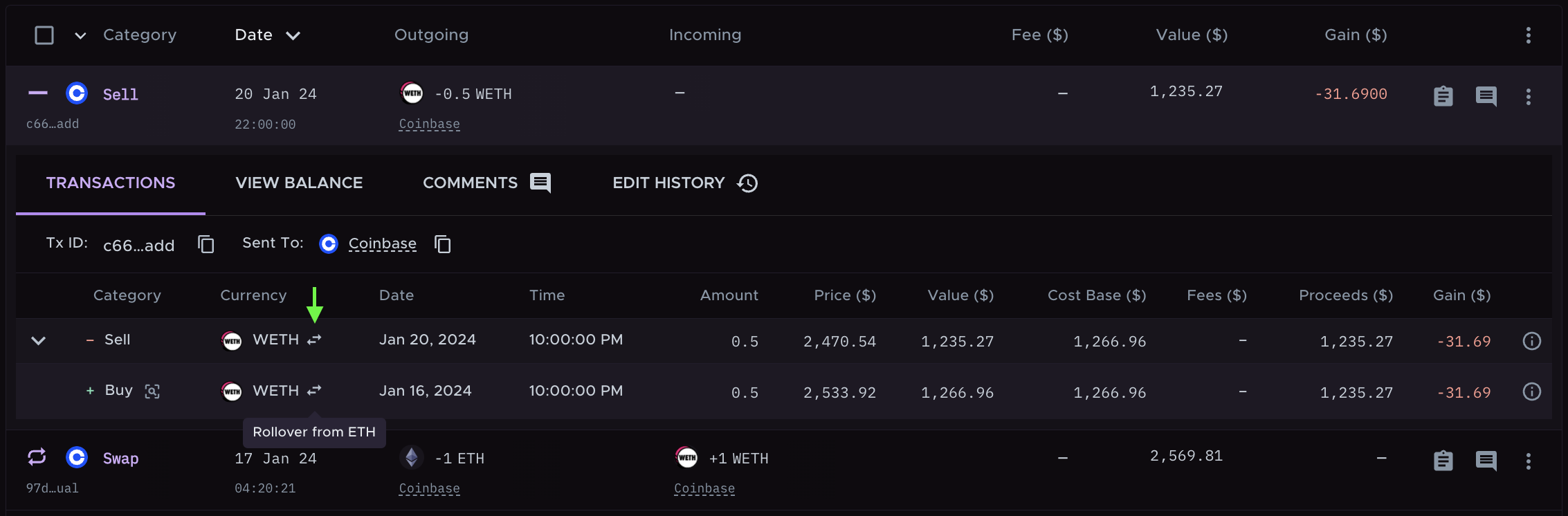
When hovering over the two-way arrows, a rollover card appears. It refers to how Summ tracks the cost basis when a swap or non-taxable trade transaction (e.g., exchanging ETH for WETH) occurs in the transaction history of the disposed asset. Instead of treating the original asset as a disposal that triggers a taxable gain or loss, the cost basis of the original asset, adjusted for fees, rolls over to the new swapped asset.
For example:
Action | Market Price | Cost Basis | Gains |
Buy 1 ETH | $1,000 | $1,000 | - |
Swap 1 ETH for 1 WETH | $2,000 | $1,000 (Rollover) | - |
Sell 1 WETH | $ 2,500 | $1,000 (Rollover) | $1,500 |
In the Sell transaction, since the two conditions are met:
Disposal of the new swapped asset (i.e., WETH).
A swap transaction exists in the transaction history of the disposed asset.
The rollover should appear for WETH.
If you get stuck, Ask Summ in the app can walk you through it. Need a human? Submit a ticket and our support team will reply by email.