Getting started with Summ as an accountant
Last updated: October 15, 2026
Welcome to SUMM!
Navigating the world of crypto taxation can seem complex, but with SUMM (Previously Crypto Tax Calculator), you have a powerful tool to simplify the process. This guide is designed specifically for you, providing a clear, step-by-step walkthrough of SUMM's core features, along with expert tips to enhance your workflow and deliver accurate crypto tax reports for your clients.
Our goal is to equip you with the knowledge to confidently:
Import client crypto data efficiently.
Understand and categorize various crypto transactions.
Reconcile balances for report accuracy.
Leverage SUMM's features for maximum efficiency.
Let's dive in and unlock the potential of SUMM!
Creating a client
Creating a new client in SUMM on your accountant portal is completely free, although the reports and some advanced features will require a paid plan to access.
To create a new client simply navigate to the My Clients page and then press the
New Client button. Then you will just need to choose a name for the client and a the country you are setting the client up for.
It is important to note that the country can't be changed after the account is created, so make sure you are selecting the correct one!
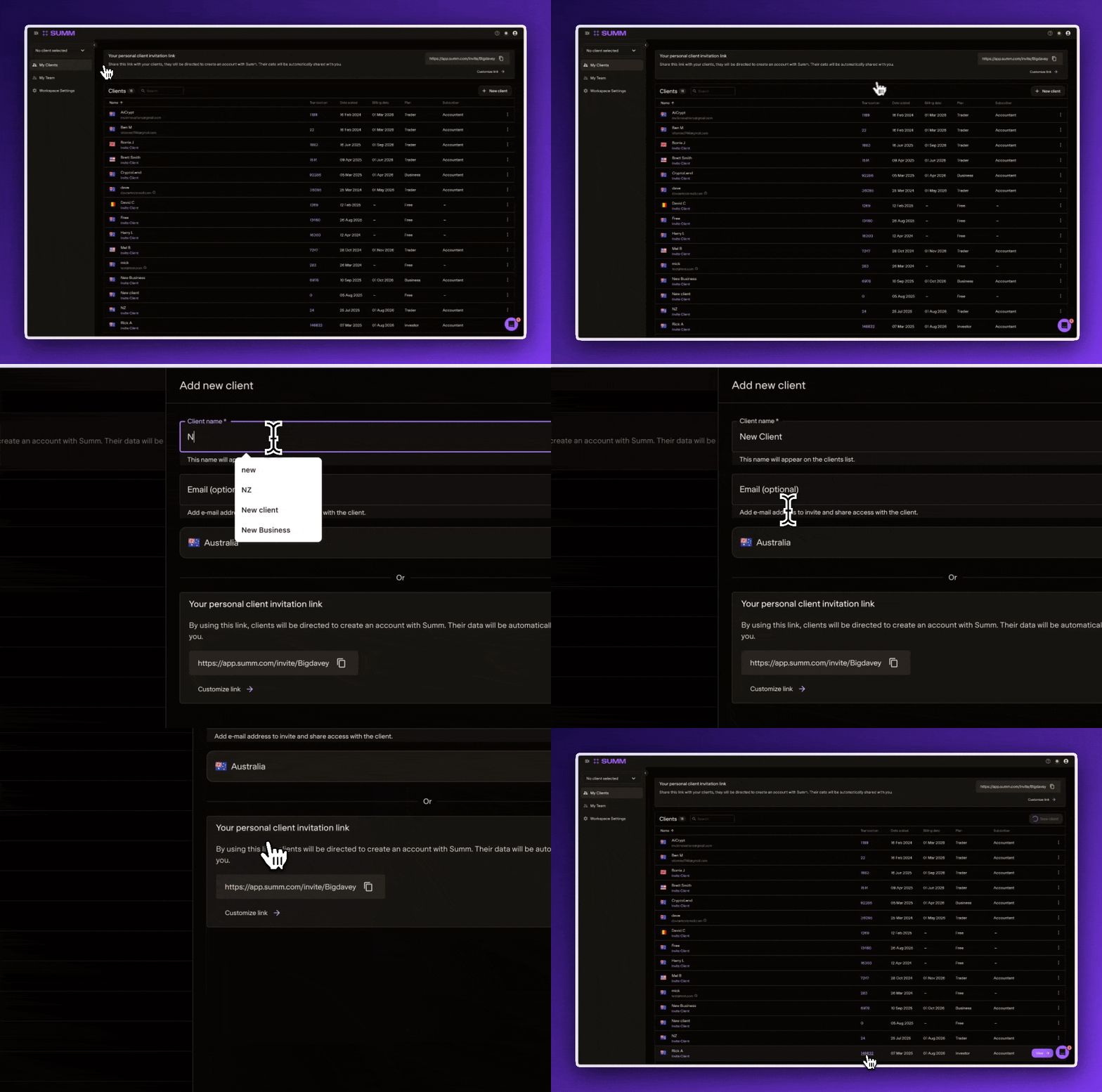
An alternative way to create a client is to use the Personal Invitation Link at the top of the My Clients page. This URL link is able to be sent to the client which will direct them to create an account that will be linked with your accountant suite.
For more information about inviting the client to have access please see the following help article: How do I invite a client?
How will you manage your clients?
Before getting started it is important to decide how you are going to manage your clients taxes. There are a few different methods you can take that are outlined below:
Full-service management
You, the accountant take care of everything, and the client doesn't use or have access to the platform at all.
Collaboration
The client has an account connected with the accountant portal and both work on the account, from uploading data to reconciliation. This can be useful as you can get the client to upload all of their data without you having to request wallet addresses and API's for all of their accounts, saving lots of time with unnecessary back and forth emails.Self-service
The client takes care of everything, and you, the accountant are there just to do a final review and generate the tax reports.
For more information of each of these methods, see the following article:
Working with clients: Full service, collaboration, and self-service
Assign your ideal settings
Once you have created the client file within the accountant portal, it’s wise to check the client setting page to make sure all settings are aligned to how you and the client want to treat certain transactions and scenarios.
We will default the settings to the safest options for each country, but as crypto taxes are new with a lot of grey areas, you may have a different approach or risk tolerance to our defaults.
For more about the settings page and what each toggle does please read through our Accountant Portal: The Client Settings page article.
Once you are happy with how the settings are it’s time to move onto the actual bookkeeping part of the process, I’ve broken this down into three simple steps:
Step 1: Importing Your Client's Crypto Data
The foundation of accurate crypto tax reporting in SUMM begins with a complete and correct data import. This crucial first step prevents many common issues later in the process.
Crypto data typically comes from two main sources:
Centralized Exchanges (CEXs): Think platforms like Coinbase, Binance, Kraken, etc.
On-Chain Transactions / Wallets (DeFi): This includes direct interactions on blockchains (e.g., Ethereum, Solana) and associated wallets (e.g., MetaMask, Phantom).
To begin importing, simply navigate to the "Accounts" page within SUMM and click "Add Account." From there, you can search for the specific exchange or wallet/chain your client uses.

Let's break down the import methods for both CEXs and On-Chain data, including their nuances.
Importing Data from Centralized Exchanges (CEXs)
SUMM boasts support for over 3,520 integrations, including 162+ centralized exchanges, with new ones frequently added! This extensive coverage ensures you can connect to most of your client's platforms.
Generally, there are three primary ways to import CEX data into SUMM:
Sync via API (Application Programming Interface)
Upload File (CSV/Excel)
Connect Your Exchange Account (Open Authorization or Oauth)
The most important factor in choosing the right method is understanding your client's transaction history on that specific exchange. Both API and file uploads can have data limitations. It's extremely important to review the "Notes" section for each import option within SUMM to make an informed decision based on your client's activity. You can even combine API and CSV methods, but be diligent in checking for duplicates, as slight data differences can make auto-detection challenging.
1. Sync via API: The Recommended Approach
API sync is often the preferred method for importing centralized exchange data because it establishes a direct, live link between the exchange and SUMM. This usually provides more reliable and comprehensive data compared to manual CSV uploads.
Why we recommend API:
Reliability: Often provides more complete data.
Ease of Updates: Simply click the "sync" button to fetch new transactions since the last import.
Important Tip: Always read the "Notes" section for any API integration within SUMM. There might be specific limitations that could affect the completeness of your client's historical data.
2. Upload File: When API isn't enough
While API is generally preferred, file upload (CSV) can be a necessary alternative, especially if an API has limitations on historical data or specific transaction types.
Considerations for File Uploads:
Manual Updates: Requires your client to download and provide a new file each time data needs updating.
Read the Notes: Just like with API, carefully review the "Notes" for CSV uploads as they detail specific data limitations for that exchange's files.
Crucial Warning: Do not modify the downloaded CSV file before uploading. Your computer's software can sometimes alter the file format, causing import errors. Upload the file exactly as it was downloaded from the exchange.
Pro-Tip: Some exchanges offer multiple file types for transactions. SUMM is designed to extract specific information from specific file types. Always follow SUMM's instructions carefully when downloading files from an exchange to ensure you get the right one.
3. Open Authorization (OAuth): Simplest Connection
This method is essentially a simplified and highly secure way to create an API connection. Instead of generating API keys manually, your client simply logs into their exchange account through SUMM's secure portal. SUMM then handles the API creation and data import automatically.
Why OAuth is often the best:
Simplicity: User-friendly secure login process.
Automated Setup: SUMM manages the API key generation for you.
Important Note: Your client will need to be present or provide their login credentials for this method, as it requires them to directly log into their exchange account to authorize the connection.
Importing On-Chain Data (Wallets or Blockchain)
Importing on-chain data is generally straightforward and only requires your client's public key (receiving address).
Simply copy and paste the public key/receiving address into the relevant chain or wallet section within SUMM, and we'll import all associated transactions.
Blockchain vs. Wallet: What's the Difference?
Blockchain: This refers to the underlying blockchain where transactions occur (e.g., Ethereum, Solana, Base).
Wallet: This is the software or hardware that interacts with the blockchain (e.g., MetaMask for Ethereum, Phantom for Solana).
Do I need to import both a Chain and its associated Wallet?
No, you do not! We offer both options in the integrations list to make it easier for users to find what they're familiar with. For example, if you import data for "Ethereum" (the chain), there's no need to also import via "MetaMask" (a wallet on Ethereum) as they will pull the exact same transactions. Choose whichever is more intuitive for you.
What if an Integration Isn't Supported?
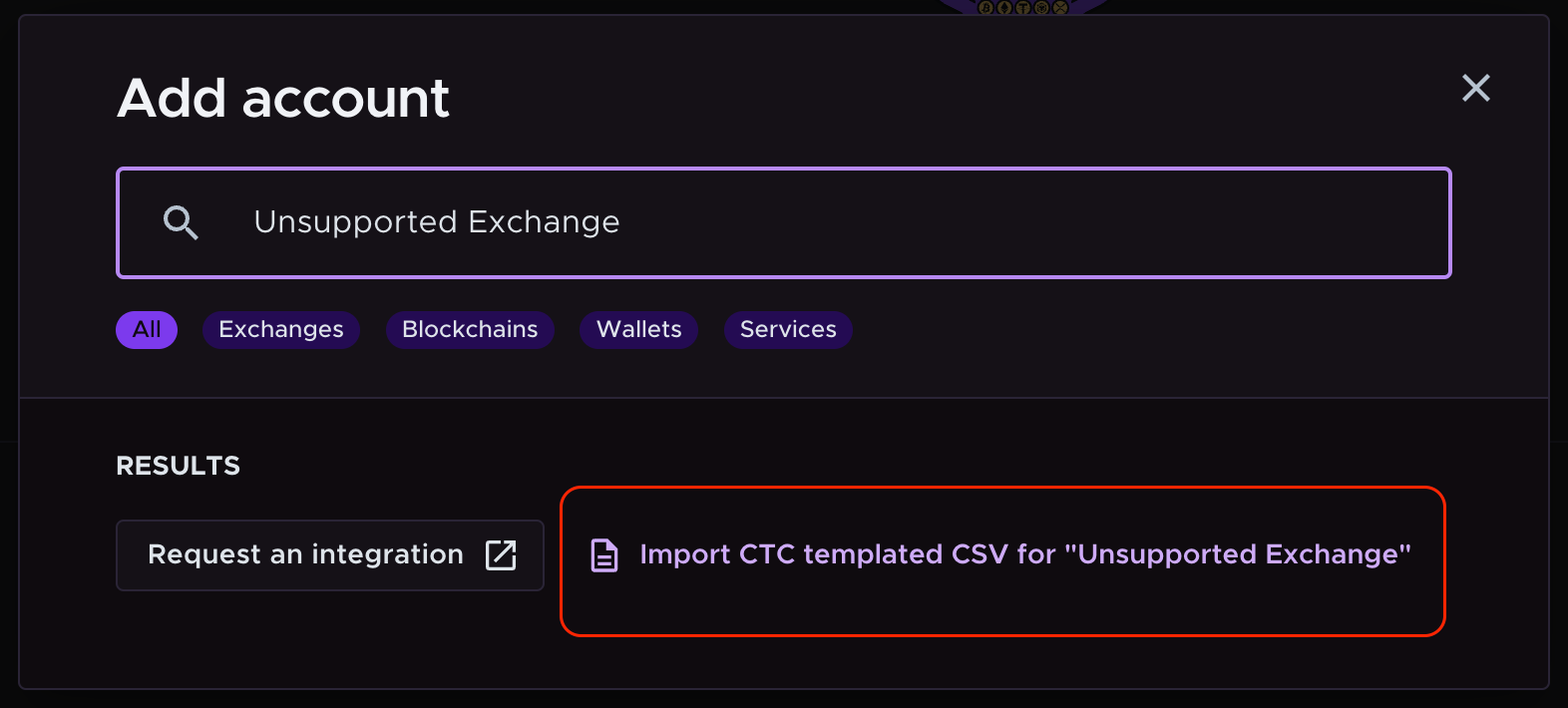
If your client's specific wallet, exchange, protocol, or blockchain isn't yet supported, you can still import their information using SUMM's manual CSV templated method.
Simply search for the unsupported exchange or wallet/chain name, then click on "Import SUMM templated CSV for '[exchange name]'". Follow the on-screen instructions to create and upload the manual file. This template ensures your data is formatted correctly for SUMM.
Step 2: Reconciling and Reviewing Your Data: The 'Review' Page
SUMM excels at interpreting and categorizing much of your client's data. However, sometimes there isn't enough information to accurately assign a category, or missing data can lead to "holes" resulting in negative balances, which can skew capital gain/loss calculations.
This is where the "Review" page becomes your best friend! It consolidates all detected issues into one centralized location, making problem-solving efficient.
Our Recommendation: Address issues in the suggested order on the Review page. Fixing problems in earlier steps often has positive ripple effects, resolving subsequent warnings automatically.

Below are the key reconciliation warnings you'll encounter in SUMM, all designed to ensure report accuracy. Each warning type will have a tips icon to help you understand what the warning means and what you should do about it.
1. Requires Categorization
These transactions haven't been assigned a category by SUMM and are typically labeled as 'categorize', 'incoming', or 'outgoing'. You'll need to manually select the correct category (e.g., Buy, Sell, Income, etc.).
Tips and Tricks:
Use the "Contract Function": For on-chain transactions, the "contract function" description under the categorise button can offer clues. For example, "Token Transfer" often indicates a simple transfer between wallets.
Explore the "Transaction ID": Clicking the "Transaction ID" link (under the categorize button) will take you to the blockchain explorer for that specific transaction. This can sometimes reveal valuable information, like counterparty details. (Only available for on-chain transactions).
"View in Context": The "View in Context" button on the far right takes you to the chronological transaction history. This can help you understand what happened immediately before or after the un-categorized transaction.

2. Missing Market Price
This warning indicates that price data for a transaction is missing, which can lead to incorrect gain calculations. This is rare but can occur if your client trades very obscure coins that SUMM doesn't have historical pricing for.
Tips and Tricks:
Search External Sources: If you encounter a coin here, it's often best to search the coin name and "historical price" on a search engine. You might find a reliable source for the needed historical information.
Derivative Assets: Sometimes, these might be derivatives of larger, well-known coins. In such cases, you might consider using the value of the main currency it's derived from. For example, "StakedmarinatedETH" might be a token received for staking ETH in a protocol. It's up to your professional judgment what value to assign to this asset based on the specific circumstances.
3. Missing Purchase History
This warning occurs when the purchase or acquisition transaction of the disposed asset is missing. Without a purchase history, the platform assumes the asset was acquired at zero cost, potentially resulting in inaccurate gains – which means your client could be over-reporting their capital gains.
Tips and Tricks:
Categorize All Transactions: First, ensure all transactions involving the asset with the missing purchase history have been properly categorized. Any uncategorized transactions in SUMMwon't affect a balance (neither increase nor decrease). So, if an incoming asset isn't categorized, its balance won't increase until you assign a category.
Leverage the Ledger: Use the 'Ledger' or 'Show balances' feature in SUMM to track the running balances. A missing purchase history is most often related to negative balances. Tracking back your balances can help you pinpoint where the discrepancy began.
For more information on how to use the Ledger page, please see our Ledger Page article.

4. Missing Blockchain
Transactions don’t have the assigned blockchain data. This is a fairly uncommon warning but can happen occasionally. It usually occurs when a centralized exchange is imported, and an asset is sent from that exchange to a blockchain that SUMM doesn't immediately recognize. In such cases, you'll simply need to specify which chain the asset was sent to.
Step 3: Sanity Checking Balances Before Downloading Reports
The final crucial step before downloading reports and filing taxes is to perform a "sanity check" on the balances displayed in SUMM against what the actual wallets and exchanges are showing your client. In SUMM, we refer to these as the "Calculated Balance" and the "Reported Balance."
Understanding Balance Discrepancies: The Balance Variation Report
SUMM provides a helpful tool called the Balance Variation Report specifically designed to identify balance discrepancies between the Calculated Balance and the Reported Balance.
Calculated Balance: This is the balance as determined by SUMM, taking into consideration all imported and categorized transactions.
Reported Balance: This is the current balance as reported directly by the exchange or wallet.

Let's break down each component of the Balance Variation Report:
Entity Type: This tells you whether the import is from an exchange (e.g., Binance, Coinbase) or a wallet/chain (e.g., Solana, Ethereum).
Entity Identifier: This column identifies the specific wallet or exchange being referenced.
Currency: This column identifies the specific cryptocurrency for which the balance is displayed. Each currency will have its own row.
Calculated Balance: The balance as computed by SUMM based on all imported transactions.
Reported Balance: The current balance as reported by the exchange or wallet.
Difference: The numerical difference between the Calculated and Reported balances. A positive figure means SUMM's Calculated Balance is higher than the Reported Balance, while a negative figure indicates the Reported Balance is higher than SUMM's.
Balance Error: This provides a worded description of the discrepancy or error found in the data, offering insights into the potential cause.
Caveats for Using the Balance Variation Report:
CSV Imports: Transactions imported via CSV files do not have a "Reported Balance" from the source. Therefore, SUMM won't display anything in the "Reported Balance" column for these entries.
Manual Wallet Imports: Transactions manually added to a wallet that hasn't been directly imported (e.g., via API or public key) won't show on this report, as SUMM cannot fetch a "Reported Balance" for it.
Other Ways to Sanity Check Balances
As noted in the caveats, there are instances where SUMM cannot automatically fetch a "Reported Balance." In these situations, the most reliable method is to obtain this information directly from your client.
Once you have the client's reported balances, you can compare them against the Inventory report in SUMM for the date the client provided their balances.
Once all balances in SUMM accurately match what your client is actually holding across their various crypto platforms, you are ready to download the necessary reports and proceed with filing their crypto taxes.
Common Transaction Categories and Their Meaning
Understanding how SUMM categorizes transactions is fundamental to accurate reporting. Here's a breakdown of common transaction types you'll encounter and their implications:
Buy
A Buy transaction represents the acquisition of the underlying asset (i.e. the purchase of the cryptocurrency). It's used to calculate the cost basis for future cryptocurrency sales. This does not trigger a capital gains tax event.
Sell
A Sell transaction represents the disposal of the underlying asset (i.e. the sale of the cryptocurrency). As a result, this sale triggers a capital gains tax event. The capital gain/loss is calculated based on the cost base of the asset (the price at the time of sale + any additional fees incurred due to the acquisition/disposal of the asset) and the value of the asset at the time of sale.
Specifically, the capital gain/loss is the 'received amount' minus the 'cost base'.
Learn more:
Trade
When a sell and a buy happen at the same time, as part of the same transaction we will group them together as a trade. The trade will have the same implications as a sell and a buy.
The Sell will cause a capital event to occur and the buy will create a cost base for the newly acquired asset
Send/Receive
A Send or Receive transaction is used to represent the movement of an asset between different wallets, exchanges, or accounts, where you maintain control of the underlying asset. As you do not 'dispose' of the asset, this transaction type does not trigger a capital gains tax event. Once a Send and Receive link together they become a Transfer as we will explain below.
Examples:
Sending cryptocurrency from an online exchange to your hardware wallet.
Receiving cryptocurrency from an online exchange to your hardware wallet.
Depositing cryptocurrency to a staking contract where you maintain ownership of the asset.
Withdrawing cryptocurrency from a staking contract where you have maintained ownership of the asset.
Transfer
If our auto-matching transfer algorithm has been able to link together a Send and Receive transaction, then it will be marked as a Transfer. Criteria for being auto-matched include, but are not limited to:
The 'Send' and 'Receive' transaction occurs less than 1 hour apart and the 'Send' is earlier than 'Receive'.
The underlying cryptocurrency transferred is the same.
The underlying quantity and valuation are similar (taking into account any fees paid) for both the 'Send' and 'Receive'.
Example: The 'Send' and 'Receive' transactions in the table below will be grouped into a 'Transfer' as they satisfy the auto-matching criteria.
Learn more:
Fiat Deposit/Withdrawal
The Fiat Deposit or Fiat Withdrawal categories are used when you deposit or withdraw fiat currency into or out of a fiat onramp exchange.
Examples:
Depositing fiat onto an exchange from your credit card.
Withdrawing fiat from an exchange into your bank account.
Chain Split
The Chain Split category is used if you acquired a new cryptocurrency due to a chain split (such as Bitcoin Cash being received by Bitcoin holders). There is no income or capital gains tax event when receiving the new cryptocurrency. The new cryptocurrency received will have a cost basis of $0 for future trades.
Airdrop
The Airdrop category is used if you acquired cryptocurrency due to an airdrop. Proceeds from airdrops do not trigger an immediate capital gains taxable event. It can be treated as income and trigger an income tax event depending on your 'Airdrop' category tax toggle. Any future sale of the cryptocurrency is a capital gain event with a cost basis the same as the airdrop’s value when you received it.
Mining
A Mining transaction is used if you acquired cryptocurrency as a result of mining activities as a hobby (e.g. BTC mining). The tax implications of the mining transaction will depend on the tax laws of your local jurisdiction.
Interest
The Interest category is used if you acquired cryptocurrency due to interest-bearing activities that don't suit any of the other categories. Examples include earnings from lending, DEFI yield farming, high-interest cryptocurrency savings account, etc.
Proceeds from interest do not trigger an immediate capital gains taxable event but are classified as income; any future sale of the cryptocurrency is a capital gain event with a cost basis the same as the income price.
Example: If you received 100 Sushi when its price is $10/SUSHI, you sell one month later when the price is $1/SUSHI, your income is $1,000 and capital loss is $900.
Income
An Income transaction is used if you receive cryptocurrency through a salary, wage, or another form of general income (including referrals, completing surveys, etc).
Proceeds are classified as income, based on the price when the transaction occurs. Any future sale of the crypto is a capital gain event with a cost basis the same as the income price.
Personal Use
The Personal Use category is used if you have disposed of cryptocurrency for the purpose of purchasing goods or services. Please contact your accountant if you decide to use this transaction category, as it will have different tax implications than a Sell transaction.
Read more: Personal Use Category
Lost/Stolen
The Lost or Stolen categories are used if you have lost cryptocurrency or had it stolen (e.g., 'rugged' by scammers). This will trigger a capital loss tax event, where the loss = ($0—the cost base of the cryptocurrency).
Read more: Lost, Stolen or Hacked Crypto
Gift and Outgoing Gift
Gift: The Gift category is used if you have received cryptocurrency as a gift. Similar to a Buy transaction type, the capital gain/loss is calculated based on the price at sale and the price when the gift is received. Receiving cryptocurrency as a gift does not trigger a capital gain or income tax event.
Outgoing Gift: The Outgoing Gift category is used when you give cryptocurrency as a gift. It can be treated as taxable or non-taxable. Check the Tax toggle - Treat outgoing gift as non-taxable disposal guide for more information.
Note: If you are giving a gift to someone else in the form of cryptocurrency and, as a result, you are disposing of the asset (for CGT purposes), then we typically recommend making this transaction a Sell.
Fee
The Fee category is used if you have disposed of cryptocurrency to cover the cost of fees generated due to other transactions. In crypto fees are often called Gas or Gas Fees.
Example:
Fees paid when withdrawing cryptocurrency from a centralized exchange to your personal wallet.
Gas fees paid during on-chain Ethereum swaps when interacting with decentralized exchanges. You can read more details about Ethereum gas fees here.
Rebate
The Rebate category is used if you have acquired cryptocurrency as a rebate (e.g., credit card rebate, fee rebate, etc). Classified similar to a 'Buy' transaction type (the cost base at the time of acquisition), this transaction type does not trigger an income event.
Ignore In/Out
The Ignore-in or Ignore-out categories are used to ignore a particular transaction from tax and balance calculations. This is a useful 'soft' alternative to deleting a transaction.
Failed In/Out
The Failed In or Failed Out categories are used for marking failed transactions (whether in or out). The transaction itself will be ignored from tax calculations, but any fees incurred from creating the transaction will be accounted for.
Example: You tried to send ETH to someone during a period of high network congestion. However, the transaction failed because the gas limit set was too low to cover the required fee. While the transfer didn’t go through, the gas fee was still charged by the Ethereum network.
Realized Profit/Loss
The Realized Profit or Realized Loss categories are used for margin, futures, derivates, etc. type trades, where a profit or a loss has been realized on the trade. Proceeds from these trades count are classified as income.
Learn more: Understanding a Margin Trade
Loan
The Loan category is used when you have borrowed cryptocurrency or fiat (typically via a lending platform) using collateral. This does not trigger a capital gains tax event. It will be used as the cost basis for future sales of the borrowed asset.
Learn more:
Margin Fee
The Margin Fee category represents a fee or interest paid to maintain an open loan position. This can be associated with margin trades, futures trades, CFD, derivative trades, and standard loans).
Loan Repayment
The Loan Repayment category is used when repaying the collateral on a loan. This is separate from any fees or interests charged for maintaining the loan. The disposal of cryptocurrency can trigger a capital gain (or loss) on the difference from your purchase price.
Learn more: Reconciling a Margin Trade Borrow and Repayment
Liquidation
A Liquidation transaction is used when the lending, margin, or futures trading platform has liquidated your supplied collateral to cover their losses. This typically is caused by the inability to pay back a loan or due to price volatility (i.e. getting margin called). This will trigger a capital loss tax event, where the loss = ($0 - the cost base of the cryptocurrency), as you are disposing of the asset and receiving nothing in return.
Collateral Deposit
A Collateral Deposit is used when depositing crypto collateral into a protocol in order to borrow or take a loan against your crypto.
Collateral Withdrawal
A Collateral Withdrawal is used when you have paid back the loan you have taken against crypto collateral and you are now withdrawing the initially deposited collateral from the lending protocol.
Cross Chain Trade
A Cross Chain Trade is used when you completed a cross-chain swap involving trading assets on one chain for different assets on another. If the transactions are not grouped, you can categorize the incoming transaction as Cross Chain Buy and the outgoing transaction as Cross Chain Sell.
Spam In
SUMM does a good job in detecting most spam transactions but some can still come through every now and then. Spam transactions are often sent to onchain wallets as a way to try and scam the user into clicking a ling that can drain their wallet of its funds.
Obviously this is to be avoided so when a transaction is categorised as Spam we will by default remove it from the transaction list for peace of mind. These transactions usually happen on chains that have low transaction fees, as it much cheaper to bulk send spam to a lot of wallets.
There are a few ways you can detect when a transaction is a spam such as, they often have $0 value and strange names that sometimes include a website URL. The Spam In category will ignore the transaction from tax and balance calculations.
Spam Out
Similar to the Spam In category there can sometimes be Spam/scam transactions that are outgoing. Personally I have no idea how they’re able to do this but it can happen. They act in the same way as any other Spam/Scam transaction and are usually designed to get the user to click a link that will drain their wallets funds.
Key Takeaways for Accounting Professionals
Data Import is Paramount: Emphasize to your clients the critical importance of importing all their crypto data accurately and completely from all sources.
Review Page is Your Friend: Utilize the "Review" page in SUMM to efficiently identify and resolve data inconsistencies, missing information, and categorization needs.
Sanity Check Balances: Always perform a final sanity check of balances in SUMM against your client's actual holdings before generating reports. The Balance Variation Report and the Inventory Report are key tools for this.
Understand Transaction Categories: A solid understanding of how SUMM categorizes transactions and the tax implications of each category is essential for accurate reporting.
Stay Updated: The crypto landscape and its associated tax regulations are constantly evolving. Stay informed about changes and updates to ensure you provide accurate and compliant tax services.
Conclusion
SUMM is a powerful ally for accounting professionals navigating the complexities of crypto taxation. By following this guide, leveraging SUMM's features, and applying these tips and tricks, you can streamline your workflow, enhance accuracy, and confidently deliver comprehensive crypto tax reports for your clients.
We hope this guide has been helpful! Should you have further questions, please refer to the SUMM Help Center or contact support in the bottom right hand corner of the screen. Our support also utilizes a helpful AI chatbot that is trained on our entire helpcentre, so if you ever get stuck or need a quick helper, give it a try!