
How to Reset Password
If you forgot your password or can't log in, click Forgot your password? on the login page and enter your email address. We'll email you a link to reset your password.

Note:
Check your spam folder for the reset email.
You can only reset your password in Summ if you sign in with your email and a password.
If the reset link doesn't work
Open an incognito (private) window in your browser. In most browsers, click the three dots at the top right.
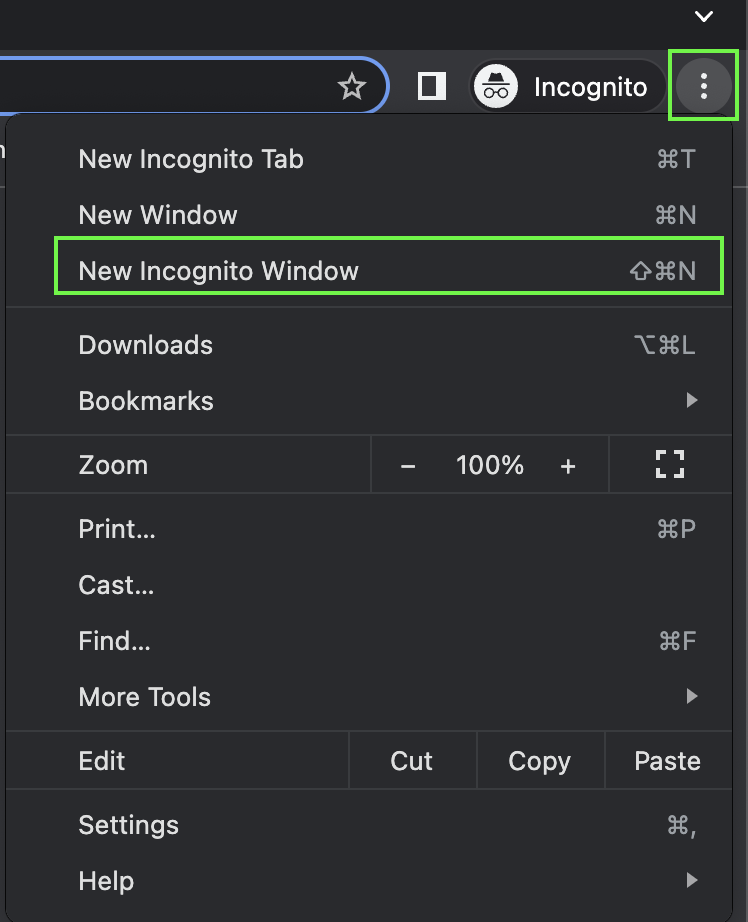
Open https://app.summ.com/forgot in the incognito window and enter your email address to get a new reset link.

Change your password while logged in
If you know your current password and want to change it:
Go to Settings > Account.
Click Password, then Reset password.
Enter your old password and your new password twice. If you have 2FA turned on, also enter your authentication code or a recovery code.
Click Save new password.
What if I log in with a Google account?
You can't reset a Google password in Summ. If you sign in with Google, reset your password in your Google account. The same applies to other sign-in providers such as Apple, Coinbase, and Xero.
Still need help? Email [email protected].